NetSuite Dropshipping: How It Works, Limitations, and How to Automate It
Table of Contents
- What Is NetSuite Dropshipping?
- How the Native Workflow Operates
- Limitations of Native NetSuite Dropshipping
- NetSuite Dropship Automation Options
- Software Comparison: Tools at a Glance
- How Inventory Source Fits In
- How Flxpoint Powers NetSuite Automation
- Build vs. Buy: The Honest Calculation
- Key Metrics to Track After Go-Live
- Final Thoughts
What Is NetSuite Dropshipping?
Dropshipping separates the sales function from fulfillment. Dropship retailers accept customer orders without stocking inventory; third parties warehouse and ship products directly to buyers.
According to Statista, the global dropshipping market is expected to reach $476 billion in 2026, up from $129 billion in 2020.
NetSuite, as a cloud-based ERP system, includes dropship functionality within its Items & Inventory features. When enabled, NetSuite dropshipping integration automatically generates purchase orders to preferred vendors when sales orders arrive for designated dropship items.
For multi-subsidiary businesses, this model can also extend to intercompany inventory dropship scenarios. In these cases, one subsidiary sells to the external customer while another subsidiary fulfills the order from its warehouse. NetSuite manages the linked intercompany sales and purchase transactions behind the scenes, ensuring accounting alignment across entities.
This dropship model works for modern merchants expanding product catalogs without capital tied up in warehousing. But the native NetSuite workflow carries design assumptions that become constraints when order volume scales.
The dropshipping cycle
Three parties power dropshipping:
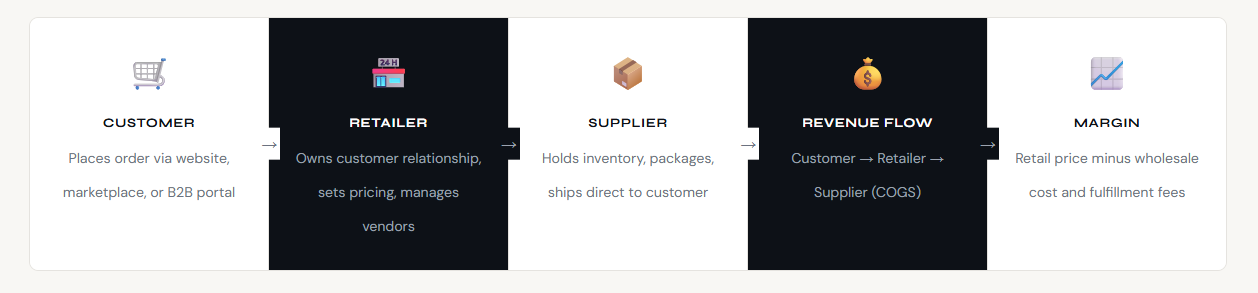
- The customer places orders through your sales channel: website, marketplace, or B2B portal.
- The retailer owns the customer relationship, sets retail pricing, and contracts with suppliers for fulfillment.
- The dropship supplier maintains inventory, packages products, and ships directly using their logistics infrastructure.
⚠️ Key Insight: The dropship model thrives on volume, not unit margin. Margins per order are thinner than self-fulfilled retail, so the operational infrastructure automation, routing, vendor connections; directly determines profitability. Manual processes don’t just slow you down; they erode the margin advantage that makes dropshipping viable.
How the Native NetSuite Dropship Workflow Operates
NetSuite’s built-in dropship feature requires setup across three areas: feature enablement, item configuration, and vendor assignment. Understanding this native workflow is essential before evaluating any NetSuite automation software — because every automation gap begins here.
Step 1: Enable dropship features
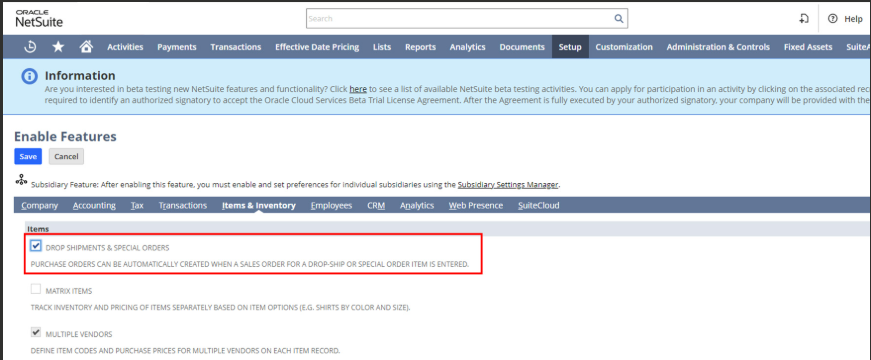
Navigate to Setup > Company > Enable Features. Under the Items & Inventory tab, check “Drop Shipments & Special Orders.” This unlocks dropship checkboxes on item records and enables automatic purchase order generation.
Step 2: Configure item records
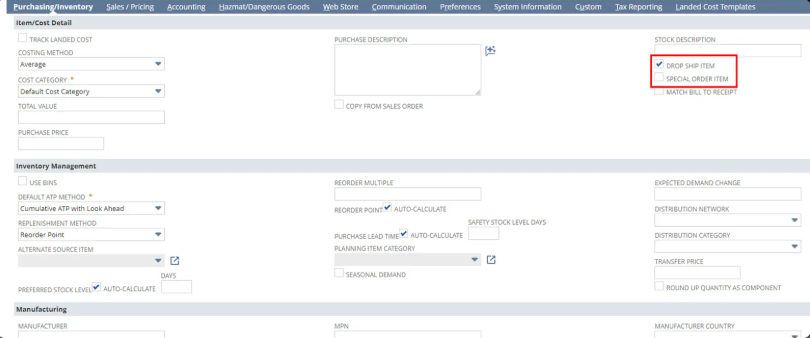
For each dropship item:
- Mark the item as “Drop Ship Item” in the Purchasing/Inventory tab
- Assign a preferred vendor
- Enter purchase price
Once you check either Drop Ship Item or Special Order Item, NetSuite removes the ability to fulfill from on-hand inventory. The system treats these as external fulfillment paths.
Step 3: Automatic purchase order creation
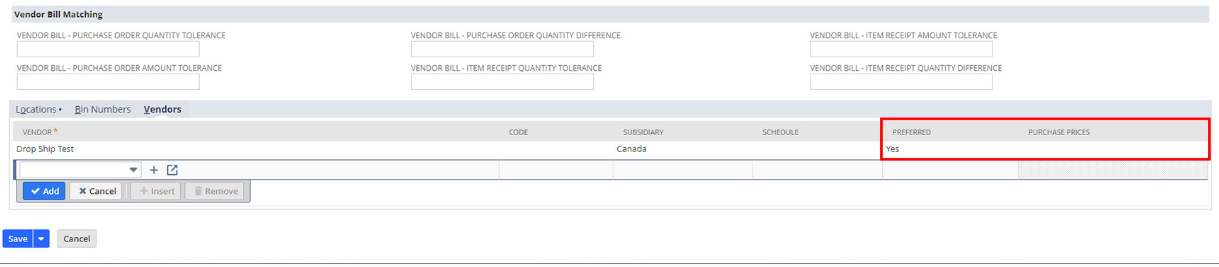
When a sales order contains a dropship item, NetSuite order management automation creates a linked purchase order to the preferred vendor. The purchase order includes the customer ship-to address, order line items, preferred vendor pricing, and a linked sales order reference. The accounting stays clean; revenue records without adding stock to inventory counts.
What happens at fulfillment
Different NetSuite configurations handle dropship fulfillment differently:
| Configuration | Sales Order | Purchase Order | Billing Behavior |
| Advanced Shipping + Advanced Receiving | Create Invoice manually after vendor marks PO as Shipped | Click Mark Shipped (no item receipt) | Vendor bill created manually |
| Advanced Shipping only | Create Invoice manually | Click Mark Shipped | Vendor bill can be created after shipment |
| Advanced Receiving only | Invoice created when processing billing | Click Mark Shipped | Vendor bill created from PO |
| Neither enabled | Invoice created when processing order | Click Mark Shipped | Vendor bill created from PO |
Important Clarifications: Drop ship orders do not create inventory impact — no on-hand quantities are increased or decreased. The vendor shipment drives billing eligibility. Revenue recognition depends on your accounting setup and invoicing rules. If running Advanced Shipping, invoicing is separated from fulfillment; otherwise NetSuite combines the steps when you process the order.
Limitations of Native NetSuite Dropshipping
NetSuite’s dropship functionality works for small-scale operations. But four structural limitations emerge as order volume grows — and understanding each one is the foundation for choosing the right NetSuite integration platform.
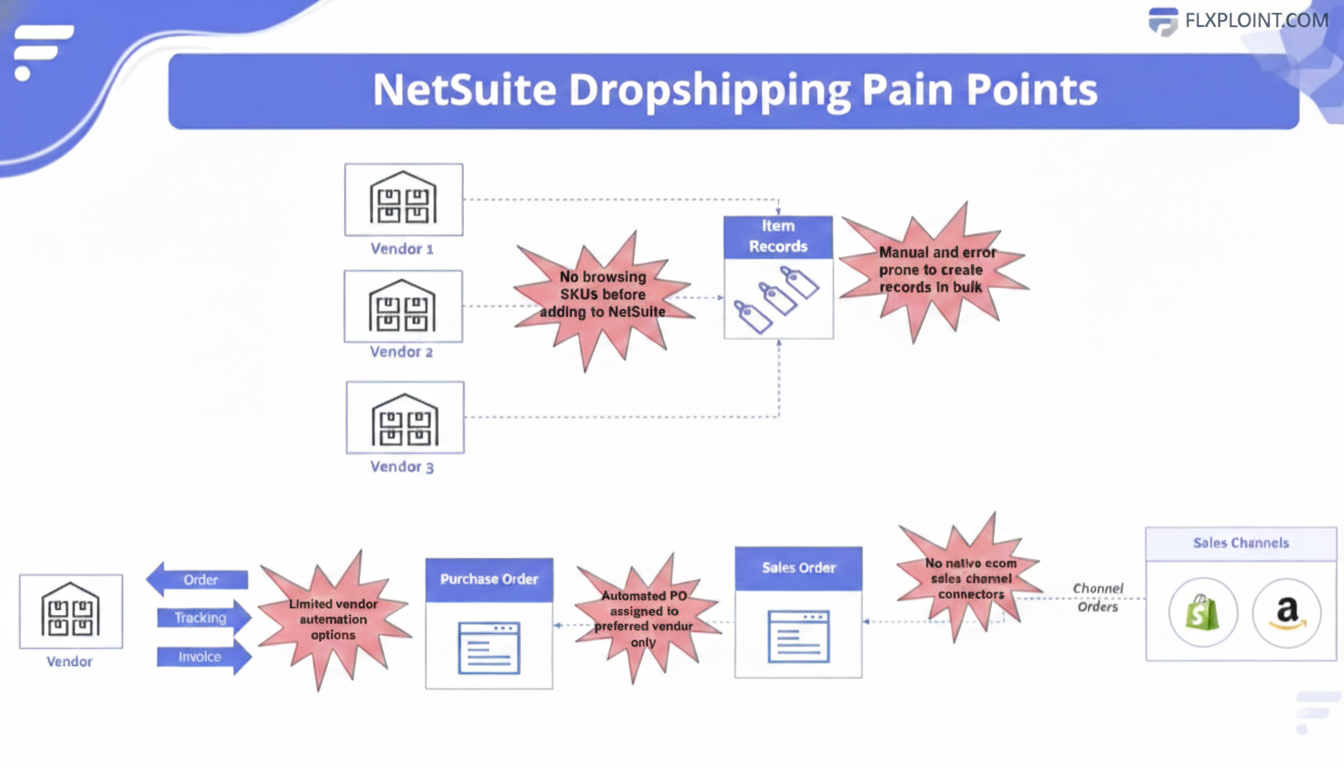
Source link: [Webinar] NetSuite + Flxpoint: From Preferred Vendor to Dynamic Order Routing
Preferred vendor rigidity
NetSuite’s only automation option for purchase order generation is preferred vendor routing. You assign one vendor per item. When orders arrive, the system cuts purchase orders to that vendor; no dynamic logic, no real-time evaluation, no exceptions.
You can’t automatically route based on:
- Real-time inventory availability
- Vendor pricing changes
- Shipping costs or delivery speed
- Geographic proximity to customers
- Vendor performance metrics
This becomes a serious problem when multiple vendors stock the same item. According to the NetSuite Professionals Slack Group, a community of nearly 20,000 professionals, manually reviewing and changing vendor assignments on purchase orders is one of the top pain points users report.
Manual item record creation
Dropshipping operates at high SKU volumes; hundreds or thousands of items across multiple vendors. Creating item records in NetSuite requires five to fifteen minutes per item. You need to mark the item as a Drop Ship Item, assign a preferred vendor, enter purchase price, configure multiple vendor pricing if applicable, and set up item categories and classifications.
With no ability to browse vendor catalogs before creating records, teams often create records for products they never sell. That bloats the item list and makes ongoing management harder.
Limited vendor connection options
Native NetSuite offers email as the primary vendor communication method. Some environments include fax options.
What’s missing:
- EDI (Electronic Data Interchange) connections
- API integrations
- CSV/XML file automation
- Vendor portal access
- Real-time inventory sync
Most vendors can’t accept emailed purchase orders as their primary order method. That forces manual workarounds or custom development.
Tracking and fulfillment gaps
Staff manually copy tracking numbers into item fulfillment records. NetSuite won’t automatically create fulfillments when vendors ship.
Returns create another challenge; without customization, dropship returns can pollute inventory records because the system doesn’t handle the “never received into inventory” logic consistently. High-volume operations also trigger NetSuite governance limits: caps on script executions and API calls that turn automated workflows into manual firefighting.
These four limitations point to the same root cause: NetSuite was designed for simplicity, not for multi-vendor scale. Fixing them requires automation software that operates alongside NetSuite; not inside its constraints.
NetSuite Dropship Automation Options
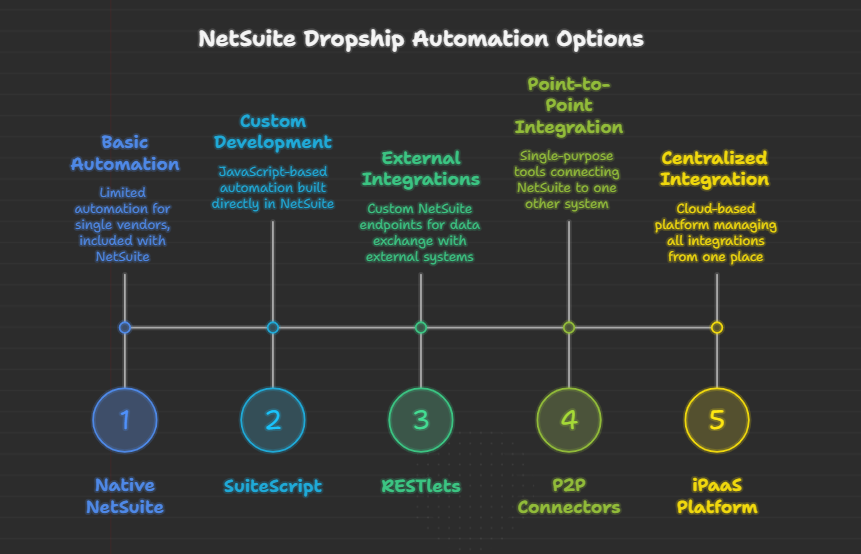
Five primary approaches exist for automating NetSuite dropshipping beyond native functionality. Each comes with trade-offs in scalability, maintenance, and long-term flexibility. Knowing where each fits and where each breaks is essential for choosing the right NetSuite API integration strategy.
- SuiteScript Custom Development
SuiteScript is NetSuite’s built-in JavaScript scripting framework. It allows developers to write custom logic directly inside the ERP environment; no external systems required. For teams with strong NetSuite developers, it provides maximum control over in-system automation.
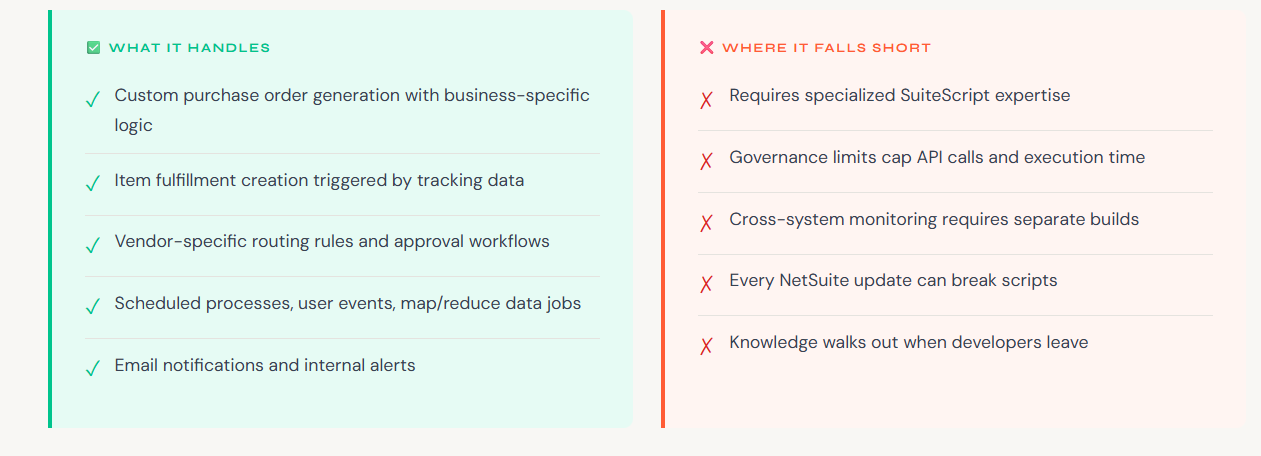
Real-world scenario: A dropship retailer builds a SuiteScript to auto-create purchase orders. It works at 500 orders/day. At 5,000 orders/day, they hit governance limits mid-batch. The “automated” system becomes manual intervention; exactly what they were trying to avoid.
- RESTlets for External Connections
RESTlets expose custom API endpoints within NetSuite, allowing external systems to exchange data with your ERP. They’re the technical backbone for vendor integrations when native options don’t exist; but they require ongoing developer ownership.
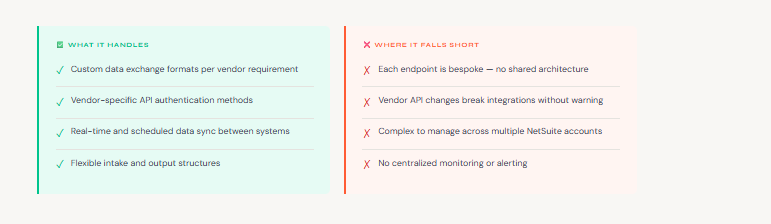
RESTlets are powerful when your team has deep NetSuite architecture experience and a small number of well-defined integrations. They become brittle when you’re managing 20+ vendor connections, each with its own requirements and update cadence.
- Point-to-Point (P2P) Connectors
Point-to-point connectors are pre-built tools that link NetSuite to one other specific system; typically a single sales channel like Shopify, or a specific vendor platform. They offer fast deployment for simple scenarios but don’t scale gracefully.
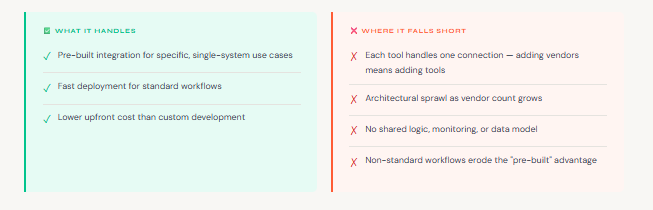
P2P connectors make sense for retailers with one vendor and one sales channel. Once you add a second vendor, you’re managing two separate tools with no unified view. At five vendors, you’re managing an integration estate instead of running a business.
- iPaaS (Integration Platform as a Service)
iPaaS platforms centralize all integrations through one system. Rather than building custom endpoints or managing isolated connectors, you connect everything; vendors, channels, ERPs; through a single orchestration layer. This is where NetSuite automation for ecommerce becomes genuinely strategic.
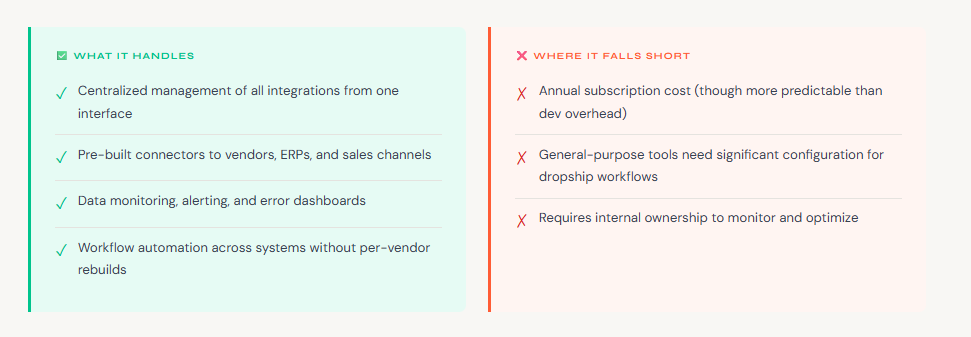
iPaaS platforms are the right architectural choice for multi-vendor dropship operations. The key differentiation is whether the platform is general-purpose or purpose-built for ecommerce and dropshipping; that distinction determines how much configuration work remains after deployment.
- Purpose-Built Dropship Automation Platforms
A subset of iPaaS platforms are built specifically for ecommerce dropshipping; not general integration use cases. These platforms arrive pre-configured for vendor connectivity, order routing, inventory sync, and fulfillment lifecycle management. They skip the blank-canvas configuration that general iPaaS tools require.
What purpose-built platforms add over generic iPaaS:
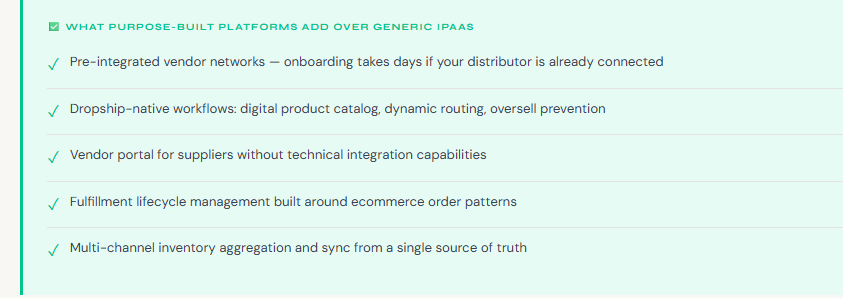
- Pre-integrated vendor networks; if your distributor is already in the network, onboarding takes days
- Dropship-native workflows: digital product catalog, dynamic routing, oversell prevention
- Vendor portal for suppliers without technical integration capabilities
- Fulfillment lifecycle management built around ecommerce order patterns
- Multi-channel inventory aggregation and sync from a single source of truth
Flxpoint is the leading example of this category. It was designed from the ground up for ecommerce brands running multi-vendor dropship operations; with NetSuite as a primary integration target.
Software Comparison: Tools at a Glance
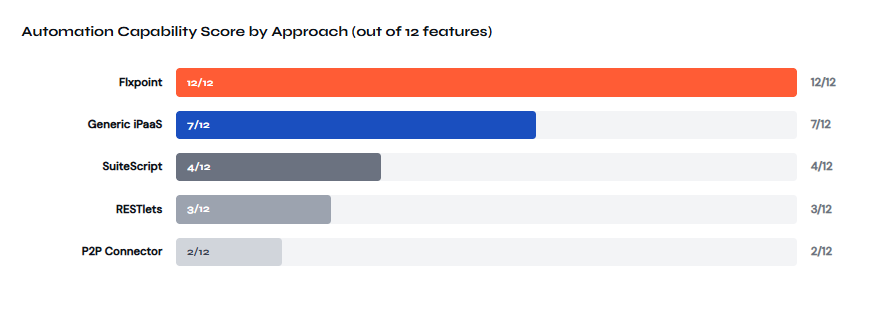
The table below maps every key dropship automation capability across all five approaches, giving you a single reference point for your evaluation. This is the clearest way to see why purpose-built NetSuite automation software outperforms every alternative at scale.
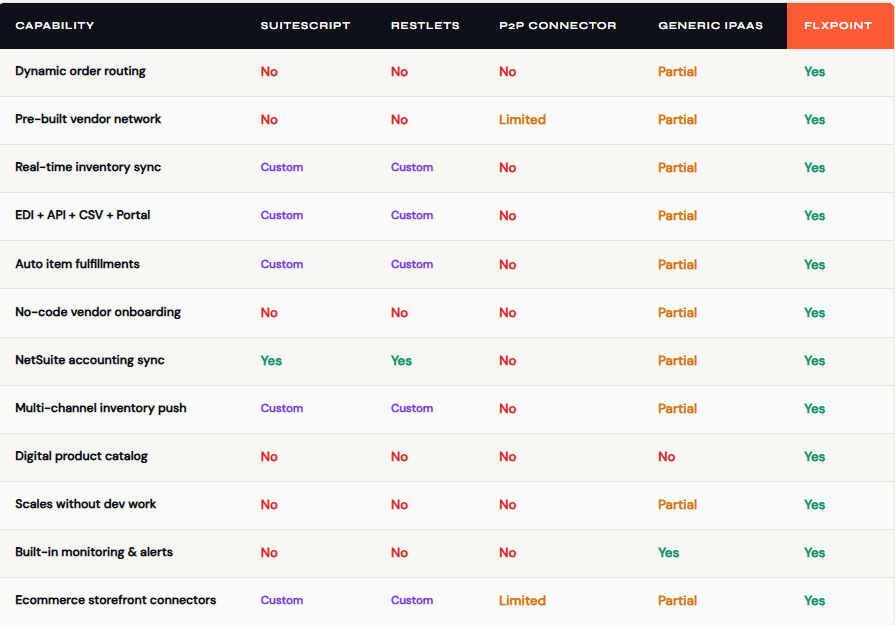
Yes = native, out-of-box. Partial = possible with configuration or add-ons. Custom = requires developer build. No = not supported.
How Inventory Source Fits In
Before diving into Flxpoint, it helps to understand where Inventory Source sits in a NetSuite ecommerce stack. Many dropship businesses rely on more than one system. Each platform plays a specific role rather than one tool replacing everything.
Inventory Source is a dropship automation and supplier network platform. It connects retailers to hundreds of pre-integrated dropship suppliers and focuses on supplier data management. That includes syncing product catalogs, inventory quantities, and pricing from vetted suppliers into sales channels like Shopify, WooCommerce, and Amazon.
Where Inventory Source Fits in the NetSuite Stack
Inventory Source supports supplier discovery and catalog data syndication. It bridges dropship supplier networks and your selling channels by providing access to a curated directory of vetted suppliers, so you can browse and connect with approved product sources for your catalog.
Operational automation inside NetSuite is a separate layer. Order routing, fulfillment workflows, and accounting synchronization require deeper ERP-level logic. That is where a platform like Flxpoint operates, managing order flow, vendor routing, and downstream data synchronization.
If you are starting with dropshipping and need access to a structured supplier network, Inventory Source offers an accessible entry point. As your order volume increases and your NetSuite environment becomes more complex, you need stronger automation and multi-vendor routing. That is when an operational layer built for NetSuite becomes essential.
How Flxpoint Powers NetSuite Automation
Flxpoint is a purpose-built dropship automation platform that connects vendors, sales channels, and your NetSuite ERP through one unified system. It’s not a general integration tool configured for dropshipping — it was designed specifically for ecommerce brands that need multi-vendor fulfillment at scale, with NetSuite ERP integration as a primary use case.
Here’s how each capability maps to the limitations and gaps covered earlier in this guide.
Vendor Connectivity: Every Format, One Interface
Native NetSuite offers email as its vendor communication ceiling. Flxpoint replaces that constraint with a multi-format connectivity layer that meets vendors where they are, regardless of their technical sophistication:
- Pre-built integrations; Connections to major distributors and suppliers are ready out of the box. If your vendor is already in the network, deployment takes days rather than months.
- File-based automation; For vendors who send CSV or XML feeds via email or SFTP, Flxpoint handles file retrieval, mapping, and import automatically. No coding required.
- API and EDI; Full support for modern REST API connections and traditional EDI protocols for enterprise suppliers.
- Vendor portal; Smaller suppliers without technical infrastructure can log into a self-service portal to update inventory and confirm order fulfillment.
- Ecommerce store connections; Pull inventory and push orders directly from vendors running Shopify, BigCommerce, or Magento storefronts.
A team adding a new vendor asks: is this vendor already in the Flxpoint network? If yes, configure and go. If not, select the appropriate connection type; file mapping, API, EDI, or portal; through a single interface. No new developer engagement required.
Digital Product Catalog: Stop Creating Records You’ll Never Use
Before any vendor product becomes a NetSuite item record, Flxpoint’s digital product catalog lets you filter against your own criteria. Define your rules once:
- Category restrictions to exclude products outside your scope
- Margin thresholds to hide items that don’t meet profitability targets
- Brand allowlists or denylists
- Price range requirements
When vendors add new products, Flxpoint evaluates them automatically against these rules. Only items that pass surface for merchandising decisions; eliminating the problem of creating thousands of NetSuite records for products you’ll never sell.
When you’re ready to list an item, Flxpoint creates the NetSuite item record automatically, configured correctly as a drop ship item with the appropriate vendor associations, removing the five to fifteen minutes of manual setup per item that native NetSuite requires.
Dynamic Order Routing: The Core of the Platform
This is the direct answer to NetSuite’s preferred vendor rigidity. When an order arrives, Flxpoint’s routing engine evaluates every available fulfillment source in milliseconds; dropship vendors, internal warehouses, and 3PL providers; then selects the best one based on your business logic:
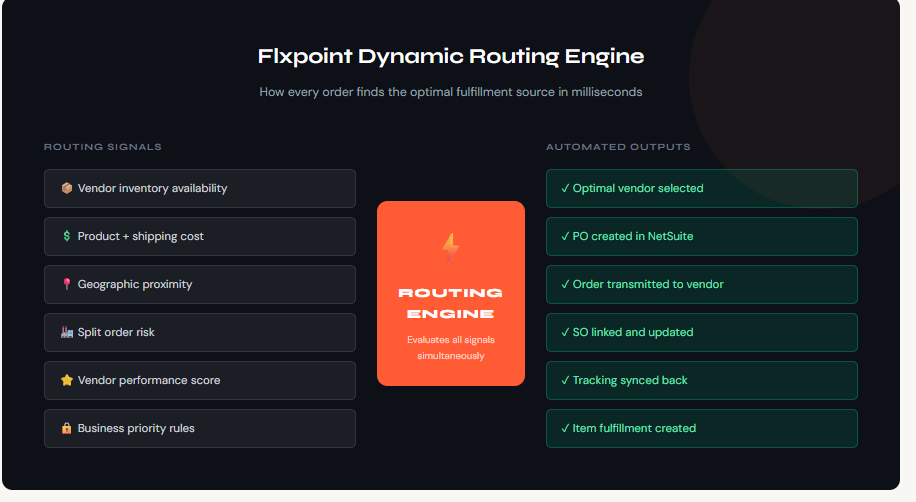
- Cost optimization; Route to the vendor with the lowest combined product and shipping cost
- Inventory availability; Never route to a vendor who can’t actually fulfill the order
- Split order prevention; Prefer vendors who can ship the complete order in one shipment
- Geographic proximity; Factor in distance to the customer for faster delivery
- Vendor priority; Manually override automated routing when business relationships require it
Once a routing decision is made, Flxpoint automatically generates the corresponding purchase order in NetSuite. The manual review loop; where teams were going back into each PO to check stock availability and correct vendor assignments; is eliminated.
Automated Order Lifecycle: Zero Manual Clicks
In native NetSuite, moving a single order from sales order to item fulfillment record requires six to eight manual clicks — per order. At scale, that’s hours of daily staff time plus compounding error risk at every step. Flxpoint replaces that entire process with automated data flow, powering end-to-end NetSuite order automation without manual intervention.
Flxpoint owns the full lifecycle without manual intervention:
- Order arrives from Shopify, Amazon, BigCommerce, or another connected channel
- Routing engine selects the optimal fulfillment source
- Order transmits to the vendor in their required format (EDI, API, CSV, portal)
- Sales order and linked purchase order are created in NetSuite automatically
- Vendor ships; tracking data returns through the same connection
- Item fulfillment record is created in NetSuite without manual entry
- Tracking syncs to the originating sales channel
- Customer receives shipment notification
Every step that was previously a manual click or a copy-paste operation is replaced by automated data flow between Flxpoint, vendors, and NetSuite.
NetSuite Accounting Sync
Flxpoint integrates with NetSuite via REST Web Services and Token-Based Authentication — the same secure foundation that NetSuite uses for all external NetSuite API integration connections. For each dropship order, the platform creates the sales order with full customer data, generates the linked purchase order to the fulfilling vendor, maintains the SO-PO relationship throughout the lifecycle, and creates item fulfillments automatically when vendors ship.
When vendors invoice for shipped orders, Flxpoint generates the corresponding vendor bills in NetSuite — closing the accounting cycle without manual reconciliation. Partial billing is also supported: when a vendor invoices only some PO lines, Flxpoint handles multi-stage billing correctly across separate invoice events, supporting both Order-level SKU and PO-level SKU configurations.
Multi-Channel Inventory Sync
Flxpoint aggregates inventory across all vendors and warehouse locations, then pushes accurate totals to every sales channel from a single source of truth. Display rules are fully configurable per channel:
- Total available inventory across all vendors
- Quantities broken out by specific warehouse location
- Safety stock buffers to protect against overselling
- Rounded quantities for wholesale customers
- Maximum display quantities per channel
Retail and wholesale channels can show entirely different inventory views; different rules, different thresholds, different logic; all drawing from the same underlying data. This creates a scalable foundation for multi-vendor marketplace integration, automated order flow, and controlled inventory distribution across every channel you sell on.
Build vs. Buy: The Honest Calculation
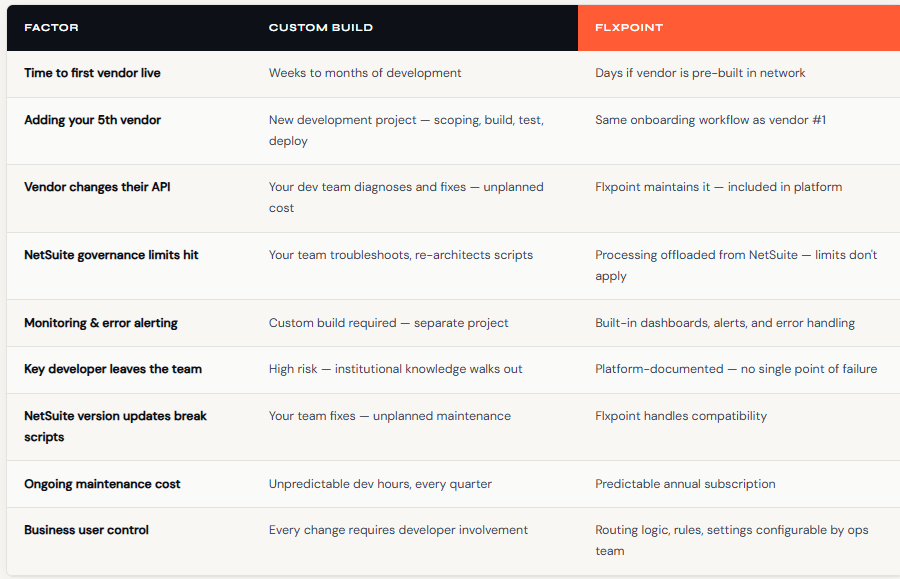
At this point in the evaluation, most teams face a direct question: build automation internally through SuiteScript, RESTlets, or bespoke development, or buy a platform like Flxpoint. Custom development appears cheaper at the start — no subscription, full control, built exactly to spec. But the true cost calculation changes as operations scale, and the hidden costs in the build column compound continuously.
Custom development is built. Flxpoint is buy. The buy option delivers proven workflows refined across thousands of NetSuite onboardings — not a blank canvas that requires reproducing that learning from scratch at your expense.
— Flxpoint + NetSuite Webinar: From Preferred Vendor to Dynamic Order Routing
The hidden costs in the custom build column compound over time. Every new vendor is a new project. Every vendor that changes a file format or API header is an unplanned maintenance event. Every developer who built your automations and then left takes undocumented institutional knowledge with them.
These aren’t theoretical risks — they’re the operational reality that the majority of NetSuite users running custom-built dropship automations eventually face.
Key Metrics to Track After Go-Live
Deploying a NetSuite integration platform is only half the equation. Once vendors are connected, orders are flowing, and fulfillments are automating, you need a clear view of whether the operation is actually performing. These five metrics give you an operational health check across every layer of your dropship setup.
- Order-to-shipment time
Track the hours between order placement and vendor shipment. A healthy dropship operation runs within 24–48 hours. Times beyond that point to vendor performance issues, routing misconfiguration, or transmission delays in your integration. Monitor by vendor to pinpoint bottlenecks before they affect customers. With Flxpoint, orders route to the right vendor in milliseconds; eliminating the manual review loops that inflate this number in native NetSuite setups.
- Perfect order rate
The percentage of orders delivered complete, on-time, and damage-free. Target above 95 percent. Calculate as: (Total orders − orders with any issue) ÷ Total orders. Issues that disqualify an order include late shipments, damaged goods, wrong items, short shipments, and cancellations. A well-configured integration reduces the error rate on order transmission and fulfillment creation; two of the most common sources of imperfect orders in manual workflows.
- Vendor fill rate
The percentage of ordered units that vendors actually ship. Calculate by vendor: Units shipped ÷ Units ordered. Vendors claiming inventory they don’t have is one of the most damaging problems in dropshipping; it leads to cancellations, customer dissatisfaction, and reputation damage on marketplace channels. Vendors consistently below 90 percent need a performance conversation or replacement. Real-time inventory sync prevents orders from routing to vendors who can’t actually fulfill them, reducing fill rate failures before they happen rather than managing them after.
- Cost per order
Total fulfillment costs divided by order count. A complete calculation includes product cost, shipping charges, platform fees, payment processing, and any customer service time attributable to order issues. Track this monthly. Rising costs without corresponding revenue growth are an early signal of margin pressure. Flxpoint’s routing engine can prioritize the vendor with the lowest total cost; product plus shipping; on every order, not just a static preferred vendor assignment.
- Inventory accuracy
In a dropship environment, inventory accuracy measures how closely NetSuite records reflect actual vendor stock; it is fundamentally a measure of integration health. Sample vendor inventory weekly. Accuracy above 98 percent indicates a reliable sync. Below 95 percent, overselling risk becomes material. This is where the gap between native NetSuite and an iPaaS platform is most visible: NetSuite won’t reflect vendor inventory unless you import it manually. Flxpoint continuously syncs vendor stock levels, pushing accurate quantities to NetSuite and to every connected sales channel.
These metrics are most useful when reviewed by vendor, not just in aggregate, so problems isolate quickly and the right conversation happens with the right supplier.
Final Thoughts
NetSuite is the right backbone for ecommerce brands that need reliable ERP, clean accounting, and a scalable operational foundation. But its native dropship capabilities were designed for simplicity; and simplicity has a volume ceiling. Preferred vendor routing, manual tracking entry, and no built-in vendor connectivity are design choices that reflect a straightforward fulfillment model, not the multi-vendor, multi-channel reality most growing brands operate in.
The five automation paths covered in this guide each address those limitations in different ways. SuiteScript and RESTlets give you maximum control at the cost of maximum developer dependency. P2P connectors solve single connections quickly but fragment as you scale. Generic iPaaS centralizes your integrations but requires you to configure dropship logic from scratch. Purpose-built platforms like Flxpoint arrive pre-configured for exactly the workflows NetSuite dropshipping demands.
For brands that are past the point where native NetSuite is enough; and past the point where custom development is sustainable; Flxpoint is the operational infrastructure that makes scaling possible. Vendor connectivity in every format, dynamic routing that replaces manual PO review, real-time inventory sync that prevents overselling, and an automated lifecycle that removes the manual clicks from every order, every day.
Ready to Close the Gaps in Your NetSuite Dropship Workflow?
See how Flxpoint connects to NetSuite, routes orders dynamically, and automates the full fulfillment lifecycle purpose-built for ecommerce brands that need to scale.
Request a Demo →
Explore Inventory Source →
Discover the Power of Inventory Source: An Introduction Video
Recent Articles
Technical Framework for Assessing Firearm Accessory Suppliers in a Regulated Ecommerce Environment
Guide to assessing firearm accessory suppliers with compliance, SKU governance, and risk controls in regulated ecommerce.
Privacy-First Dropshipping: Ensuring Discretion, Compliance & Payment Safety with Adult Suppliers
Build a privacy-first adult dropshipping system with discreet workflows, supplier safeguards, and compliant payment handling for sensitive products.
Advanced Compliance for Electronics Dropshipping: FCC/CE/UL Validation and Automation Workflows
Automate FCC/CE/UL certification checks to reduce risk, block unsafe electronics, and scale compliant dropshipping across multi-supplier catalogs.